

Table of Contents
Why Interactive and Game-based Learning Demands More Than Just Compliance
Our industry is increasingly focused on digital accessibility standards due to regulations such as Title II in the United States and the European Accessibility Act. For developers of interactive and game-based learning content, complying with these standards presents real challenges.
The nature of interactive materials, with moving characters, audio instructions, response fields, and visually rich scenes, require an accessible design approach from the outset. Running an accessibility audit at the end of development is simply insufficient. Our design choices around colour, sound, input controls, movement speeds and instructional language, have to be based in a deep understanding of all possible access needs that learners may have.
Developing that understanding takes time and effort. There is considerable work involved to truly understand the barriers our materials may present to learners with auditory, visual, or motor needs, as well as learners with dyslexia, autism and ADHD. But undertaking this work enables us to produce interactive materials that provide all learners with an equally enjoyable and effective learning experience.
Here's What Actually Helps
Schedule time for training
Time needs to be allocated for production teams to conduct research and develop the skills required to produce interactive materials that work for all learners. Accessibility representation bodies are only too happy to consult with production teams if necessary, to provide guidance and feedback. The scale of this upskilling is considerable as teams may include instructional designers, visual designers, animators, subject matter experts, and developers. But once that foundation is in place then accessibility becomes embedded in our practice.
Write an accessibility strategy as a team
When developing an accessibility strategy, it is incredibly valuable to involve the entire multi-disciplinary team from day one. In our experience building these workflows at Seedling, we found that co-authoring this strategy document ensured that visual designers, developers, content writers, and sound designers all understood exactly how accessibility requirements would impact their specific areas of expertise—and those of their peers. This shared ownership encourages cross-disciplinary teamwork and ensures that accessibility is treated as a core feature rather than a late-stage add-on.
Intensify your user experience process
A rigorous user experience process is central to accessible design practice. We involved learners with a variety of access needs, consulted with representation bodies, examined WCAG guidance, and identified testing partners. That process helped us develop a set of learner personas representing various access needs: low vision, complete blindness, colour blindness, partial and complete deafness, limited hand motor skills, and learners with autism, ADHD and dyslexia. Building these personas surfaced valuable questions: How does a learner with partial hearing distinguish audio instructions from sound effects? How does a learner with ADHD experience an animated background? How does a learner with motor issues navigate an activity that involves click and drag elements? Each persona reveals barriers that are easy to miss without a structured discovery process.
Design for Learner Choice
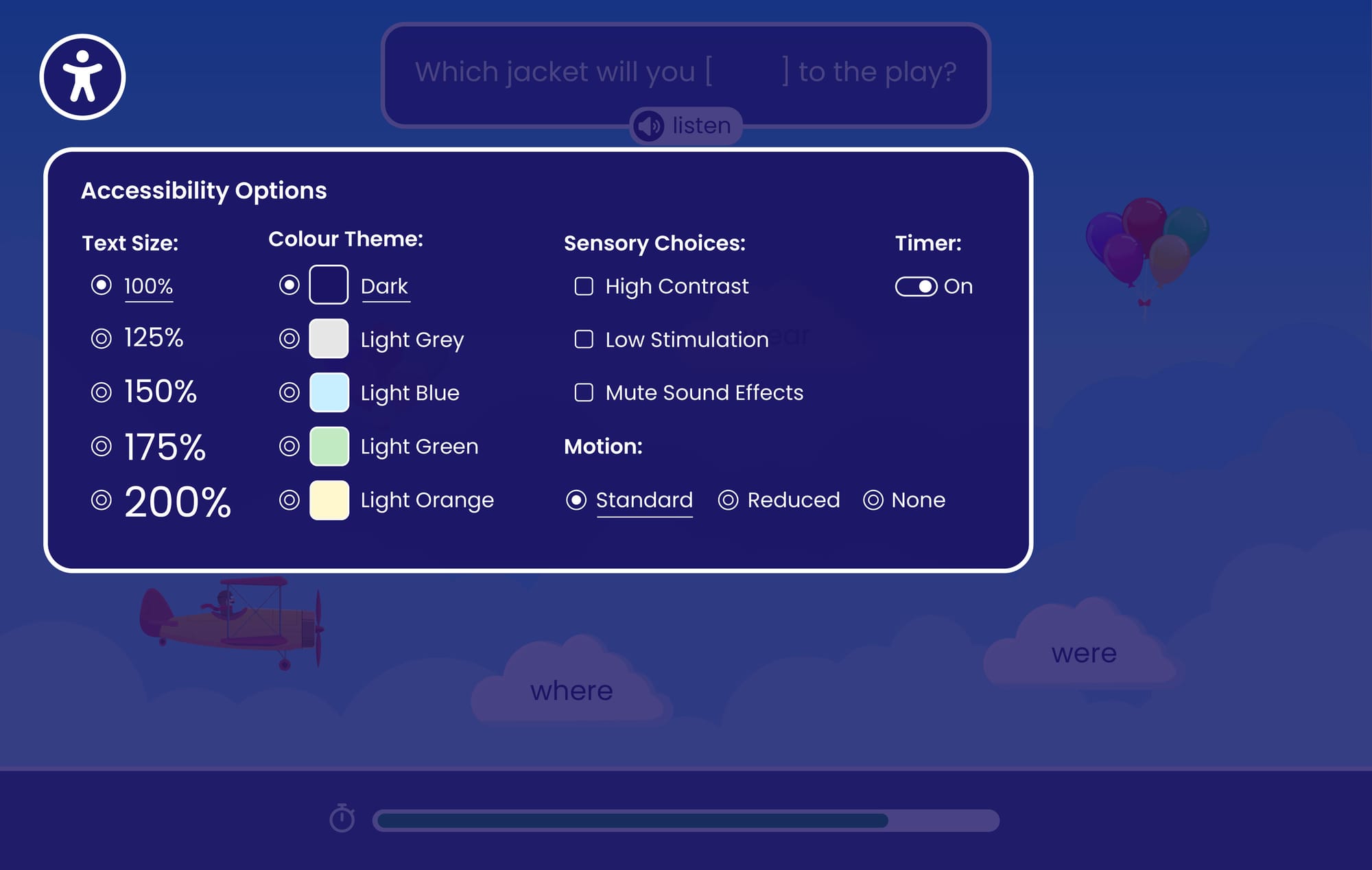
Once these barriers are understood, the design challenge becomes creating activities that remove them without compromising the game-like learning experience. Our approach is to design materials that can be adapted by the learner. To support this, we’ve built control panels into our activities, allowing learners to adjust settings such as motion speed, color contrast, audio levels and input controls. This provides all learners with an equal experience in understanding and enjoying the activity. Achieving this requires careful design so that activities still function as intended across the range of learner-selected settings and preferences.
Treat sound as a vital component
Sound design is crucial in game-based content where audio often provides guidance, feedback and learning reinforcement. To facilitate all learner needs we should treat audio as a layered system, separating sound effects, background music, and instructions into adjustable layers. Again this presents a design challenge as we must ensure learners can do this without losing the essential meaning of an activity. Adopting practices such as avoiding different sounds playing simultaneously will also help with auditory clarity.
Make interaction flexible
The controls that make a learning game feel dynamic and responsive can also make it inaccessible. Selectable areas and ‘drag and drop zones’ should be designed to be large and forgiving. Interaction shouldn’t depend on precision movements, and should have the option to be controllable by keyboard alone, ideally by a single key press or screen tap. This ensures the activity remains playable for users with limited motor function or alternative input devices.
Technical development must support your design decisions
The underlying architecture must ensure that all functional and content components are separated into their own targetable layers to enable learner control. For product teams building on an established platform, this often requires fundamental platform-level adjustments. For instance, a scalable way to handle this, which we implemented at Seedling, is to build additional backend fields and controls designed specifically to support rich, descriptive metadata. These descriptions are easily readable by screen readers but hidden from sighted users, providing essential context and orientation for learners with visual needs without cluttering the visual scene.
Words really matter for accessibility
Content writing is as important to address as any other component. Instructional designers need to consider the impact of word choices and phraseology. Longer words and complex sentences create difficulties for learners with dyslexia or low literacy. And longer words will create issues if a learner sets a font to maximum scale. In a learning game environment where text appears within areas of a scene this has to be considered at the start of writing and worked on in tandem with visual designers.
The Effort Is Worth It, for Learners and Our Business
These considered and nuanced design approaches have to become second nature to us as producers of learning content. For interactive and game-based content there is considerable work to be done in design, development and testing. Every element of interactivity: movement, audio cues, background visuals and response fields can be a potential barrier for someone. Awareness of these barriers, combined with the skills to address them, are hallmarks of a progressive and innovative learning development team. The instructional designer considering word choice, the graphic designer testing at maximum scale, the sound designer separating audio layers, each of them is applying an accessibility lens that once developed, becomes an established practice. And this practice enables us to produce digital materials that are interactive, accessible and suitable for markets worldwide.


